 By
By 
How to Fix Render Farm Bottlenecks Delaying Film VFX Production?
For over two decades in the visual effects industry, I've witnessed firsthand the exhilarating rush of bringing impossible worlds to life, but also the agonizing crawl when a critical render farm grinds to a halt. It’s a scenario that plays out in studios big and small: deadlines loom, artists are idle, and millions of dollars hang in the balance, all because of a bottleneck in the very engine designed to accelerate production.
The frustration is palpable. You’ve invested heavily in cutting-edge software, talented artists, and powerful hardware, yet production schedules are consistently threatened by slow render times. This isn't just about technical glitches; it's about lost revenue, damaged reputations, and the crushing pressure on creative teams trying to deliver cinematic magic under impossible constraints.
In this definitive guide, I'll share my insights and battle-tested strategies to not just identify but decisively eliminate render farm bottlenecks. We'll dive deep into actionable frameworks, real-world case studies, and expert insights that will empower your team to optimize workflows, leverage technology, and reclaim control over your VFX production timelines.
Understanding the Anatomy of a Render Farm Bottleneck
Before we can fix a problem, we must truly understand its nature. A render farm bottleneck isn't a single issue; it's often a complex interplay of hardware limitations, software inefficiencies, network congestion, and even human workflow missteps. Think of it like a plumbing system: a clog can occur at the source, in the pipes, at the faucet, or even due to poor water pressure from the main supply.
The Multi-Layered Challenge
From my experience, studios often focus on just one layer – usually hardware – expecting a magic bullet. However, the true solution lies in a holistic approach, examining everything from asset creation to final output. Is it the raw processing power of your CPUs/GPUs, the speed of your network and storage, the efficiency of your render management software, or perhaps the way artists are preparing their scenes?
Identifying the root cause requires systematic analysis. It’s rarely about one broken component; more often, it’s about a chain of inefficiencies where the weakest link dictates the overall speed.

Strategy 1: Proactive Pipeline Optimization and Asset Management
The rendering process begins long before a frame hits the farm. The efficiency of your pipeline, particularly in asset creation and scene preparation, profoundly impacts render times. This is where I've seen some of the most significant gains made with minimal hardware investment.
Pre-Render Optimization: The First Line of Defense
Optimizing your scenes before they even touch the render farm is paramount. Complex geometry, excessive textures, and inefficient shading networks are notorious render killers. Educating artists on best practices can yield immediate and dramatic results.
- Simplify Geometry: Utilize Levels of Detail (LODs) for distant objects. Employ techniques like polygon reduction and instancing wherever possible. Don't render what won't be seen.
- Optimize Textures: Use appropriate texture resolutions. Convert textures to optimized formats (e.g., .tx or .exr tiled mipmaps) that load efficiently and reduce memory footprint. Implement texture atlases.
- Streamline Shaders: Complex shader networks with excessive computations can bog down even the most powerful machines. Encourage artists to simplify and reuse shaders, and bake complex procedural textures when feasible.
- Efficient Lighting: Reduce the number of light sources if not visually critical. Optimize shadow settings and light samples. Utilize light groups and render layers for greater control and efficiency.
Smart Asset Management for Faster I/O
The way assets are stored, accessed, and managed directly impacts I/O (Input/Output) performance, which can become a major bottleneck, especially with large scenes and high-resolution textures. A centralized, well-organized asset management system is not just good practice; it's a render farm accelerator.
Implement robust version control for all assets. Ensure assets are stored on fast, reliable storage solutions (more on this later). Utilize caching mechanisms for frequently accessed assets to reduce redundant data transfers. This significantly reduces the time your render nodes spend waiting for data, freeing them up to actually compute pixels.

Strategy 2: Intelligent Resource Allocation and Scheduling
Even with perfectly optimized scenes, an inefficient scheduling system can create artificial bottlenecks. This is where smart render farm management comes into play, ensuring that your valuable compute resources are always working on the most critical tasks.
Dynamic Load Balancing and Prioritization
A sophisticated render management system (RMS) is your best friend here. It's not enough to just queue jobs; you need dynamic allocation based on priority, resource requirements, and project deadlines. I've seen studios dramatically improve throughput by simply re-evaluating their job prioritization logic.
- Tiered Priority System: Implement a clear priority system (e.g., 'final render,' 'director review,' 'artist iteration'). Ensure high-priority jobs can preempt or utilize more resources.
- Resource Tagging: Tag render nodes with specific capabilities (e.g., 'GPU render,' 'high-memory node'). Match jobs to suitable nodes to prevent inefficient resource usage.
- Frame-Level Prioritization: For critical sequences, prioritize individual frames within a job. This allows for faster turnaround on specific shots without waiting for an entire sequence to complete.
- Dependency Tracking: Ensure your RMS understands job dependencies. Don't start rendering a composite if the background plate isn't finished.
Leveraging Cloud Bursting for Peak Demands
The cyclical nature of VFX production means render demands fluctuate wildly. Investing in an on-premise farm large enough to handle peak loads is often economically unfeasible. This is where cloud bursting becomes an invaluable strategy.
Cloud bursting allows you to seamlessly extend your on-premise render farm to public cloud providers (like AWS, Google Cloud, or Azure) during periods of high demand. This hybrid approach offers unparalleled scalability and flexibility, ensuring you never run out of compute power when deadlines are tight. As a key strategy for major VFX houses, cloud rendering ensures agility.
Strategy 3: Hardware Upgrades and Network Infrastructure Enhancement
While software and workflow optimizations are crucial, there comes a point where hardware simply becomes the limiting factor. Strategic upgrades, particularly in processing power, network speed, and storage, can yield significant performance boosts.
The CPU vs. GPU Dilemma Revisited
The debate between CPU and GPU rendering has evolved. Modern VFX pipelines often utilize both, leveraging each for its strengths. CPUs remain strong for certain types of rendering (e.g., ray tracing, complex shaders in some engines), while GPUs offer incredible parallel processing power for others (e.g., path tracing, real-time rendering, specific render engines).
"Don't just chase the latest CPU or GPU. Analyze your specific render engine, scene complexity, and project requirements. A balanced approach, or even a hybrid farm, is often the most cost-effective and efficient solution for diverse VFX workloads."
Consider a mix of CPU and GPU nodes if your pipeline supports both. Ensure your chosen render software is optimized for the hardware you're investing in. Sometimes, simply upgrading RAM or adding faster local storage to individual render nodes can alleviate local bottlenecks.
Network Latency and Storage I/O: Hidden Killers
I cannot stress this enough: a fast render farm is useless if it's starving for data. Network latency and slow storage I/O are insidious bottlenecks that often go unnoticed until production grinds to a halt. Every second a render node waits for a texture or scene file is wasted compute time.
Invest in high-speed network infrastructure (10GbE, 25GbE, or even 100GbE for larger setups) and ensure your switches can handle the traffic. For storage, consider a combination of fast Network Attached Storage (NAS) or Storage Area Network (SAN) solutions, ideally with SSDs or NVMe drives for active projects. Distributed file systems can also help mitigate single points of failure and improve access speeds across the farm.
| Component | Recommendation | Benefit |
|---|---|---|
| Network Interface Cards (NICs) | 10GbE or 25GbE minimum per node | Reduced data transfer latency, faster asset loading |
| Network Switches | Managed, non-blocking switches with sufficient port density | Eliminates network congestion, ensures full bandwidth |
| Primary Storage | NVMe or SSD-based SAN/NAS for active projects | High IOPS and throughput for texture/scene access |
| Archival Storage | High-capacity HDD arrays or cloud archives | Cost-effective long-term storage, less critical for render farm performance |
Strategy 4: Advanced Software Solutions and Monitoring Tools
The render management system (RMS) is the brain of your render farm. A robust RMS, coupled with sophisticated monitoring, is essential for identifying and resolving bottlenecks efficiently.
Render Management Systems: Beyond Basic Queuing
Modern RMS platforms offer far more than just queuing jobs. They provide critical functionalities that directly impact farm efficiency:
- Dependency Tracking: Ensures jobs only start when all prerequisites (e.g., upstream renders, asset availability) are met.
- Resource Affinity: Allows jobs to be assigned to specific hardware or software configurations.
- Analytics and Reporting: Provides insights into render times per frame, per artist, per project, helping identify patterns and inefficiencies.
- Error Handling: Automatically retries failed frames, isolates problematic nodes, and alerts administrators.
- Remote Control & Access: Enables artists and supervisors to monitor and manage their jobs from anywhere.
Invest in an RMS that integrates seamlessly with your DCC applications (Maya, Houdini, Nuke, Blender, etc.) and offers powerful scripting capabilities for automation. This is a game-changer for complex, multi-shot productions.
Real-Time Monitoring and Predictive Analytics
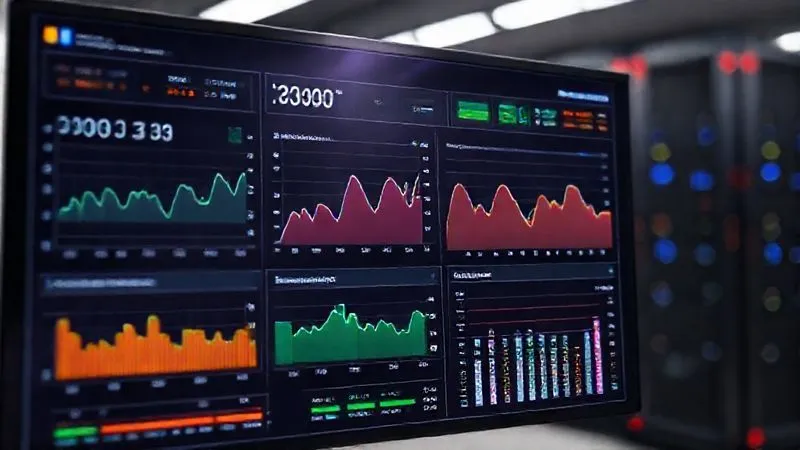
You can't fix what you can't see. Implementing real-time monitoring tools is critical for staying ahead of bottlenecks. These tools provide dashboards that visualize CPU/GPU utilization, network traffic, storage I/O, memory usage, and render queue status across your entire farm.
Even better, predictive analytics can use historical data to forecast potential bottlenecks before they impact production. Imagine receiving an alert that a particular project is projected to exceed its render budget or deadline based on its current render velocity. This allows for proactive intervention rather than reactive firefighting.
Strategy 5: Workflow Refinement and Human Factors
Technology alone isn't enough. The human element – how artists and supervisors interact with the pipeline – often introduces unforeseen bottlenecks. Addressing these human factors through education and refined workflows is a powerful, often overlooked, strategy.
Artist Education and Best Practices
Empowering artists with knowledge of render farm best practices can significantly reduce inefficient render submissions. Many render-killing mistakes stem from a lack of understanding of how their scene choices impact the farm.
- Scene Optimization Workshops: Regular training sessions on efficient scene building, texture management, and shader optimization specific to your studio's pipeline.
- Pre-Flight Checks: Implement automated or manual 'pre-flight' checks for scenes before submission to the farm, catching common errors early.
- Clear Communication: Foster an environment where artists understand the impact of their work on the farm and feel empowered to contribute to its efficiency.
Iterative Review Cycles and Feedback Loops
Excessive re-renders due to unclear feedback or late changes are a massive drain on render farm resources. Streamlining your review and approval process can drastically cut down on wasted render cycles.
Adopt tools and practices that facilitate clear, concise, and timely feedback. Utilize dailies sessions effectively, ensuring all stakeholders are present and decisions are made promptly. Encourage artists to render low-resolution or partial frames for review early in the process, only committing to high-resolution final renders when approvals are solid. This minimizes the risk of re-rendering entire sequences due to minor tweaks.
As Harvard Business Review emphasizes, effective feedback loops are crucial for operational efficiency.
Strategy 6: Implementing Distributed Rendering and Microservices
For truly massive and complex shots, conventional rendering approaches can still buckle. This is where advanced concepts like distributed rendering and microservices-based approaches offer a paradigm shift, breaking down the problem into smaller, more manageable pieces.
Breaking Down the Monolith: Micro-Renders
Instead of rendering an entire frame as a single, monolithic job, consider breaking it down into smaller components or tiles. Some advanced renderers and RMS solutions support this. Each tile or component can then be rendered independently across different nodes, and the results stitched together. This approach has several advantages:
- Improved Parallelism: Maximize the utilization of your render farm by allowing more nodes to work concurrently on parts of the same frame.
- Fault Tolerance: If one node fails, only a small tile needs to be re-rendered, not the entire frame.
- Resource Matching: Specific tiles (e.g., a complex character vs. a simple background) can be routed to nodes best suited for that task (e.g., GPU-heavy vs. CPU-heavy).
This microservices philosophy extends beyond just frames, applying to entire sequences or even individual elements within a shot, allowing for a more granular and resilient render pipeline.
Case Study: Quantum Studios' Render Revolution
How Quantum Studios Reduced Render Times by 40%
Quantum Studios, a mid-sized VFX house specializing in sci-fi epics, faced chronic render farm bottlenecks. Their existing pipeline treated each shot as a single render job, leading to long queue times and frequent re-renders whenever a minor element changed. Deadlines for their latest feature, 'Stellar Drift,' were in jeopardy.
By implementing a distributed rendering strategy, breaking down complex shots into smaller, independently renderable 'micro-services' – such as character passes, environment elements, and special effects layers – they revolutionized their workflow. Each micro-service was assigned to the most appropriate render node type (e.g., GPU nodes for volumetric effects, CPU nodes for specific ray tracing passes).
This resulted in a staggering 40% reduction in average render times per shot, significantly increased farm utilization, and a dramatic decrease in re-render overhead. Quantum Studios not only delivered 'Stellar Drift' on time but also freed up their artists to focus more on creative iterations rather than waiting for renders. This approach highlights the power of decomposing complex problems, a core principle of modern distributed computing.
Strategy 7: Data-Driven Performance Analysis and Continuous Improvement
The most effective render farms are those that are constantly evolving. This requires a commitment to data-driven decision-making and a culture of continuous optimization. Guesswork has no place in a high-stakes VFX production.
Benchmarking and Bottleneck Identification
Regularly benchmark your render farm's performance. This isn't a one-time task; it's an ongoing process. Establish key performance indicators (KPIs) and track them diligently. What's your average frame render time? What's the queue wait time? How often are nodes idle? Where are the I/O hotspots?
- Gather Comprehensive Data: Utilize your RMS and system monitoring tools to collect data on CPU/GPU utilization, memory usage, network traffic, storage latency, and job completion times.
- Analyze Trends: Look for patterns. Do bottlenecks appear at specific times of day or during particular project phases? Are certain artists or asset types consistently causing slowdowns?
- Isolate Variables: When testing changes, isolate variables to understand their true impact. Don't upgrade everything at once; test one change, measure, then proceed.
- A/B Testing: Where feasible, A/B test different configurations or workflow adjustments to see which yields the best results.
The Culture of Continuous Optimization
Foster a culture within your studio where optimization is everyone's responsibility, not just IT's. Encourage artists to report performance anomalies and suggest improvements. Hold regular post-mortem reviews after major project milestones to identify what worked and what didn't in terms of render farm performance.
The VFX landscape is constantly changing, with new renderers, software versions, and hardware generations emerging regularly. Your render farm strategy must be agile enough to adapt. A commitment to continuous learning and improvement ensures your farm remains a competitive advantage, not a production liability.
| Metric | Goal | Status | Last Update |
|---|---|---|---|
| Average Frame Render Time | Reduce by 15% | On Track | 2024-03-10 |
| Render Queue Wait Time (Peak) | < 2 hours | Needs Improvement | 2024-03-10 |
| Farm Utilization Rate | > 85% | Exceeding Goal | 2024-03-10 |
| I/O Latency (Storage) | < 5ms | Stable | 2024-03-10 |

Frequently Asked Questions (FAQ)
Q: Is it always better to render in the cloud than on-premise? A: Not always. While cloud rendering offers unparalleled scalability for peak demands, an optimized on-premise farm can be more cost-effective for consistent base loads, especially considering data transfer costs and latency for very large projects. The optimal solution is often a hybrid approach, leveraging the cloud for 'burst' capacity.
Q: How do I budget for render farm upgrades effectively? A: Start with a thorough performance audit to identify the weakest links. Prioritize upgrades that offer the highest return on investment (ROI) in terms of reduced render times and increased artist productivity. Consider the total cost of ownership (TCO) including power, cooling, and maintenance, and explore leasing options or cloud subscriptions for flexibility.
Q: What role does pre-visualization (previs) play in reducing render farm bottlenecks? A: Previs is crucial! By visualizing and locking down creative choices early with simplified assets and real-time engines, you significantly reduce the need for extensive, costly re-renders of complex shots later in production. It minimizes 'creative exploration' on the render farm, saving immense amounts of compute time.
Q: How important is network infrastructure compared to compute power? A: Extremely important. A render farm is only as fast as its slowest component. If your compute nodes are blazing fast but constantly waiting for assets due to slow network or storage, you've created an I/O bottleneck. High-speed networking (10GbE or faster) and fast storage (SSDs/NVMe) are as critical as powerful CPUs/GPUs for overall throughput.
Q: What's the biggest mistake studios make regarding render farm management? A: The biggest mistake I've observed is treating the render farm as a black box and only reacting when it breaks. A proactive, data-driven approach – continuously monitoring, optimizing workflows, educating artists, and strategically upgrading – is far more effective than reactive troubleshooting. It’s about managing an ecosystem, not just a collection of machines.
Key Takeaways and Final Thoughts
Addressing render farm bottlenecks is a multifaceted challenge that demands a strategic, holistic approach. It's not about a single fix, but a continuous commitment to optimizing every layer of your VFX pipeline.
- Proactive Optimization: Start by optimizing scenes and managing assets efficiently before they even hit the farm.
- Intelligent Scheduling: Leverage advanced render management systems for dynamic load balancing and prioritization.
- Strategic Hardware: Invest wisely in compute, network, and storage, understanding the CPU vs. GPU balance.
- Powerful Software: Utilize advanced RMS features and real-time monitoring for visibility and control.
- Workflow & Education: Empower artists with best practices and streamline feedback loops.
- Embrace Innovation: Explore distributed rendering and cloud bursting for scalable solutions.
- Data-Driven Decisions: Continuously analyze performance data to identify and resolve issues before they escalate.
By implementing these strategies, your studio can transform its render farm from a frustrating bottleneck into a powerful, reliable engine that drives creativity and ensures your film VFX productions are delivered on time and within budget. The future of visual effects demands not just artistic vision, but also technical mastery over the tools that bring that vision to life. Take control of your render farm, and unlock your team's full potential.
Recommended Reading
- 5 Proven Steps to Quantify UX Design ROI & Secure Future Investments
- 5 Steps: How to Meet Strict Broadcast Loudness Standards for TV Commercials
- 5 Proven Strategies: Taming Player Backlash from Aggressive In-Game Ads
- Refactor Monoliths: 7 Strategies for Zero-Downtime Migration
- Unmasking Stealth Threats: How to Detect Advanced Bypassing AV





0 Comentários: